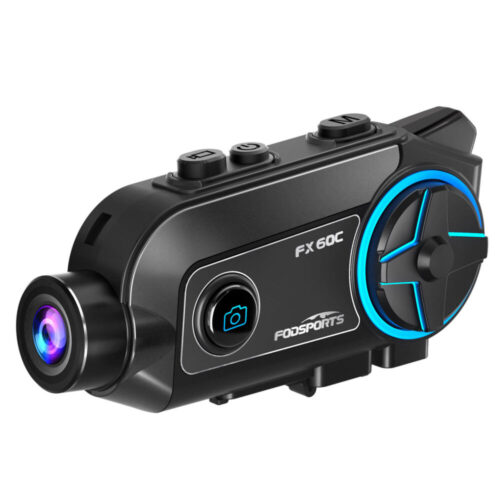
Fodsports FX60C User Manual Guide
Frequently Asked Questions
Is my unit still under warranty?
All Fodsports units come with a 1-year warranty, starting from the date of purchase. Please keep your proof of purchase in order to reclaim your warranty.
Create a record of ownership in case of loss or theft. REGISTER NOW Your first point of warranty service is your dealer
Why are my speakers volume low?
A: Please note that both the volume of the intercom or the volume of listening to music can be adjusted with the volume +- button, if you think the intercom volume is too low, you can press “+” button to increase the intercom volume.
Why are my two speakers or one side speaker unavailable/no sound?
Please note that both the volume of the intercom or the volume of listening to music can be adjusted with the spin button, if you think the intercom volume is too low, you canTurn clockwise to increase the intercom volume.
How long will it take to receive the items we buy?
For fast delivery, it will take 5-7 workdays; For standard free shipping, it will take nearly 30 workdays.
Why does the indicator light on the charging head not light up when charging?
Our product itself does not have a charging head.
1. Change the charger
2. Use the computer’s USB port to charge
For standard free shipping, it will take nearly 30 workdays.
The indicator light of the charging head is on but the indicator light of the main unit is not on
1. It is recommended to replace the charging cable (if you buy a double pack, it is recommended that the buyer exchange the charging cable for testing)
2. It is possible that the indicator light of the host is broken, other functions are normal, and it does not affect normal use
3. If 1.2 is not feasible, it is estimated to be a problem with the host, and it needs to be returned for repair or replacement
The indicator lights of the main unit and the charging head are on, the main unit cannot be turned on or the working time is very short after charging
1. It is recommended to replace the charging cable (if you buy a double pack, it is recommended that the buyer exchange the charging cable for testing)
2. It is possible that the indicator light of the host is broken, other functions are normal, and it does not affect normal use
3. If 1.2 is not feasible, it is estimated to be a problem with the host, and it needs to be returned for repair or replacement
Why can't the Bluetooth connect?
Clear the Bluetooth pairing information of the intercom and connect it again.
Bluetooth connection to mobile phone is interrupted while riding.
1. Part of the cell phone signal is blocked by the human body. Check whether the cell phone is completely blocked by the human body.
2. Whether there is signal interference in the current environment, it is recommended to connect again in another environment。
Why is there no sound when playing music on a Bluetooth-connected mobile phone?
Check whether the earphones are properly inserted as required and whether the earphones are inversely inserted. 2. Replace the earphone cable
Why can't the intercom connect?
Clear the Bluetooth pairing information of the intercom and connect it again.
Why can't I hear the other party's voice when the intercom is in use?
1. Check whether the earphone accessories are normal and properly inserted.
2. If there are too many obstacles between interphones, part of the Bluetooth signals will be blocked. It is recommended to reduce the obstacles between interphones.
3. Whether the speed exceeds 60 km/h or the distance exceeds 300 meters, it is recommended to ride within the effective speed range.
Why is the sound of the earphones low?
1. Turn up the volume of the intercom to check whether the volume is increased.
2. Check whether the earphones are properly assembled and the speakers are close to the ears.
why it can't recognize speech?
The voice assistant can be recognized only when it is connected to the Internet. Please confirm whether the mobile phone network signal is normal.
Waterproof maintenance
1. Do not soak the Bluetooth intercom in water.
2. After using the Bluetooth intercom on rainy days, wipe the water off the surface of the walkie-talkie and remove the headset to prevent water from entering the headset or USB port.
Fodsports FX60C Video Guide
Fodsports FX60C Tech Specs
| Manufacturer | Fodsports |
|---|---|
| Brand | FODSPORTS |
| Item Weight | 80g |
| Product Dimensions | 99*48.5*28.7mm |
| Item model number | FX60C |
| Batteries | 2000 mAh battery |
| Manufacturer Part Number | FX60C |
| Maximum Number of Speakers | 10 |
| special Features | 4K Camera, Waterproof, Noise Reduction |
| Max number of speakers | 10 riders speak at the same time |
| Reminder | Support battery voice reminder |
| Waterproof | IP65 |
| Maximum Intercom Distance | 2000m |
| Bluetooth Technology | QCC Chip, Bluetooth 5.4; enhanced compatibility, stable connection, and low power consumption |
| Mobile App | FODSPORTS Connect APP; control all functions through the app |
| Video Resolution | 4K/30FPS, 2K/60FPS, 2K/30FPS, 1080P/60FPS |
| Video Stabilization | HD anti-shake video recording |
| Photo Resolution | 8MP HD photos |
| Lens Angle | 130° wide-angle lens |
| Shooting Angle | 360° adjustable rotation |
| WiFi Transmission | Supports WiFi data transfer |
| Mobile Preview | View live video while recording through the mobile app |
| Music Sharing | Music sharing between two riders |
| Speakers | 40mm HRSQS high-quality stereo speakers |
| Sound Effects | DJ Bass, Popular Classics, Pure Vocals |
| Noise Reduction | Professional CVC noise reduction with a dedicated noise-canceling microphone |
| FM Radio | 76–108MHz |
| Battery Display | Battery percentage shown in the mobile app; voice battery status via button combination |
| Voice Control | Voice commands for controlling phone functions |
| Microphone Mute | Supports microphone muting during calls and intercom |
| Auto Answer | Automatically answers incoming calls within 12 seconds |
| Use While Charging | Supports intercom, music, calls, and FM radio while charging |
| Music Playback Time | Up to 36 hours |
| Intercom Time | Up to 36 hours |
| Video Recording Time | Up to 4.5 hours |
| Video + Intercom Time | Up to 3.5 hours |
| Standby Time | Up to 600 hours |
| Charging Time | Approximately 3 hours |
| Charging Port | USB Type-C |
| Rotary Button | Large rotary button for convenient operation while riding |
| Helmet Compatibility | Suitable for full-face, half-face, and other helmet types |
| Universal Pairing | Compatible with other brands of helmet intercoms, smartphones, GPS navigators, and more |
Can’t find what you need
To contact Customer Service, please
Operation hours: Mon -Fri: 9:00 AM-6:00 PM (GMT)